
Product docs and API reference are now on Akamai TechDocs.
Search product docs.
Search for “” in product docs.
Search API reference.
Search for “” in API reference.
Search Results
results matching
results
No Results
Filters
Cross-site Replication of MySQL on LKE
Traducciones al EspañolEstamos traduciendo nuestros guías y tutoriales al Español. Es posible que usted esté viendo una traducción generada automáticamente. Estamos trabajando con traductores profesionales para verificar las traducciones de nuestro sitio web. Este proyecto es un trabajo en curso.
Cross-site replication is a database pattern where changes written to a primary database in one location are copied to one or more replica databases in another location. In MySQL, this is commonly used to maintain a remote read-only copy of production data for disaster recovery testing, reporting, analytics, or standby capacity.
This guide uses Skupper to connect Linode Kubernetes Engine (LKE) clusters in different regions. Skupper creates a secure application network between Kubernetes clusters. It allows workloads in one cluster to reach selected services in another cluster without requiring direct Pod-to-Pod networking or a custom VPN. In this guide, Skupper exposes the writable MySQL primary in site-1 to the MySQL Pods in site-2 using a shared service name.
This solves a specific problem for MySQL deployed across LKE regions. The source and destination databases live in separate Kubernetes clusters with separate internal networks. The approach in this guide combines Skupper for connectivity, the MySQL Clone plugin for initial seeding, and GTID-based replication for ongoing updates.
This guide shows how to link two LKE clusters in different regions with Skupper. It then shows how to deploy MySQL in both clusters, clone the primary database from site-1 into site-2, and enable replication so that writes made in site-1 are received by the remote replicas in site-2.
Architecture Overview
This guide builds a cross-site MySQL replication topology spanning two LKE clusters:

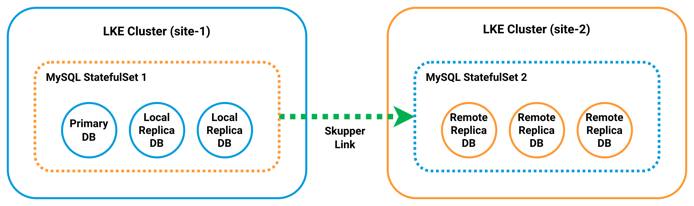
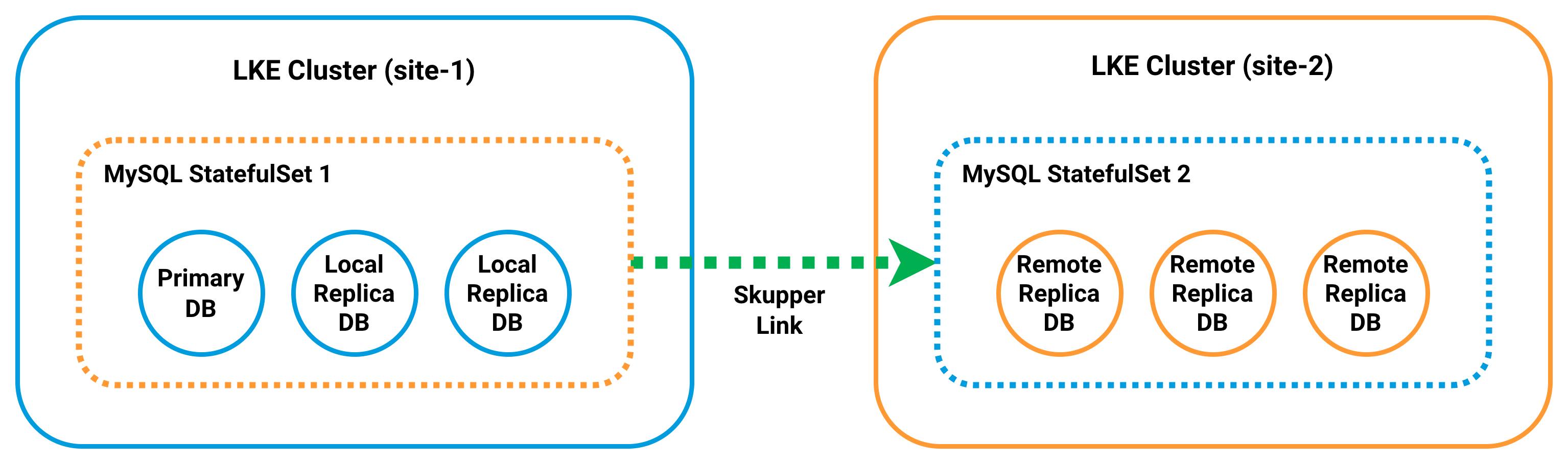
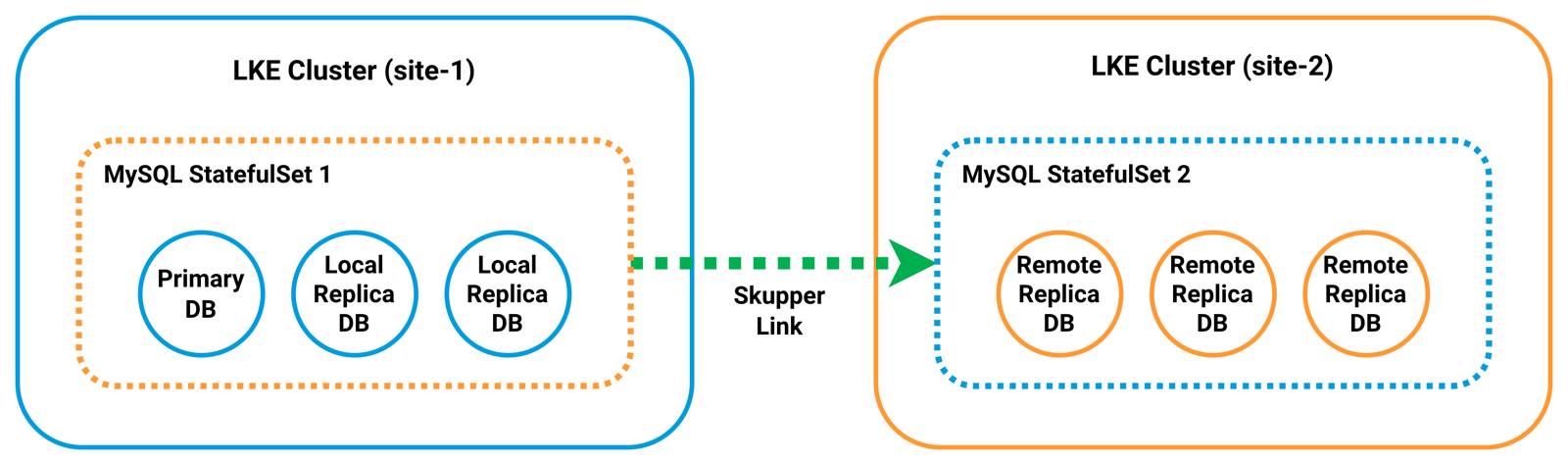
Each site runs a three-Pod MySQL StatefulSet behind a headless mysql Service. The Service provides stable DNS identities such as mysql-0.mysql. In site-1, the mysql-0 Pod acts as the writable primary. In site-2, all Pods are configured as replicas after initialization.
Skupper connects the two clusters by exposing the primary database in site-1 as a shared service named mysql-primary. This allows the MySQL instances in site-2 to reach the primary using standard MySQL client connections. It does not require direct network routing between clusters.
To initialize replication, each Pod in site-2 is first started in a writable bootstrap state. This allows it to install the MySQL Clone plugin and accept a full data copy from the primary. The Clone plugin is then used to seed each replica from mysql-0 in site-1. This provides a consistent starting point.
After cloning is complete, the site-2 Pods are reconfigured as read-only replicas and connected back to the primary using GTID-based replication. From that point, changes written to site-1 are streamed to all Pods in site-2 over the Skupper network.
Before You Begin
Follow our Get Started guide to create an Akamai Cloud account if you do not already have one.
Follow our Getting started with LKE guide to create two LKE clusters in different regions (each with three nodes), install
kubectl, and download your kubeconfig files.
Placeholders
Replace the following placeholders with values from your own environment:
| Placeholder | Description | Example |
|---|---|---|
| SITE_1_KUBECONFIG_FILE | The filename of the kubeconfig file downloaded for the site-1 LKE cluster. | site-1-kubeconfig.yaml |
| SITE_2_KUBECONFIG_FILE | The filename of the kubeconfig file downloaded for the site-2 LKE cluster. | site-2-kubeconfig.yaml |
| SITE_1_CONTEXT_NAME | The original kubectl context name associated with the site-1 kubeconfig before it is renamed to site-1. | lke12345-ctx |
| SITE_2_CONTEXT_NAME | The original kubectl context name associated with the site-2 kubeconfig before it is renamed to site-2. | lke12346-ctx |
| MYSQL_ROOT_PASSWORD | The root password assigned to the MySQL containers in both StatefulSets. | your-secure-root-password |
| MYSQL_REPLICATION_PASSWORD | The password assigned to the MySQL replication user account. | your-secure-replication-password |
| MYSQL_CLONE_PASSWORD | The password assigned to the MySQL clone user account. | your-secure-clone-password |
Additionally, this guide uses the following fixed example values consistently throughout:
- Primary LKE Cluster:
site-1 - Secondary LKE Cluster:
site-2 - Token File Path:
~/site1.token - Replication User:
repl - Clone User:
cloner - Skupper Connector and Listener Name for the Primary DB:
mysql-primary
Configure kubectl Contexts
If you followed the guides linked above, you should already have kubectl installed and the kubeconfig files for both clusters downloaded. For simplicity, merge these files and rename their contexts to site-1 and site-2.
Merge both kubeconfig files into the default
kubeconfigdirectory:mkdir -p ~/.kube export KUBECONFIG=~/SITE_1_KUBECONFIG_FILE:~/SITE_2_KUBECONFIG_FILE kubectl config view --merge --flatten > ~/.kube/config unset KUBECONFIGUse
kubectlto list your context names:kubectl config get-contextsCURRENT NAME CLUSTER AUTHINFO NAMESPACE * lke123456-ctx lke123456 lke123456-admin default lke123457-ctx lke123457 lke123457-admin defaultRename the existing contexts (e.g.,
lke123456-ctxandlke123457-ctx) tosite-1andsite-2, respectively:kubectl config rename-context SITE_1_CONTEXT_NAME site-1 kubectl config rename-context SITE_2_CONTEXT_NAME site-2Context "lke123456-ctx" renamed to "site-1". Context "lke123457-ctx" renamed to "site-2".Confirm that both clusters are reachable:
kubectl --context site-1 get nodes
kubectl --context site-2 get nodes
NAME STATUS ROLES AGE VERSION lke123456-853376-080a23780000 Ready <none> 4m v1.35.1 lke123456-853376-1278c3f50000 Ready <none> 4m v1.35.1 lke123456-853376-57b539cd0000 Ready <none> 4m v1.35.1 NAME STATUS ROLES AGE VERSION lke123457-853377-12abbc550000 Ready <none> 5m v1.35.1 lke123457-853377-196674610000 Ready <none> 5m v1.35.1 lke123457-853377-2f3f3e510000 Ready <none> 5m v1.35.1
Install Skupper
Install the Skupper CLI and deploy the Skupper controller in each Kubernetes cluster. The controller manages the secure service network that connects workloads across clusters.
Download and install the Skupper CLI on your local workstation:
curl https://skupper.io/install.sh | shAdd Skupper to your PATH:
export PATH="$HOME/.local/bin:$PATH"Verify the Skupper installation:
skupper versionCOMPONENT VERSION router 3.4.2 controller 2.1.3 network-observer 2.1.3 cli 2.1.3 prometheus v2.42.0 origin-oauth-proxy 4.14.0Note You may see the following warning when verifying the Skupper installation:
Warning: Docker is not installed. Skipping image digests search.This warning is expected if Docker is not installed on your workstation. It does not affect the Skupper CLI commands used in this guide or the Kubernetes-based deployment workflow.
Install the Skupper controller on both clusters:
kubectl --context site-1 apply -f https://skupper.io/install.yaml
kubectl --context site-2 apply -f https://skupper.io/install.yaml
namespace/skupper created customresourcedefinition.apiextensions.k8s.io/accessgrants.skupper.io created customresourcedefinition.apiextensions.k8s.io/accesstokens.skupper.io created customresourcedefinition.apiextensions.k8s.io/attachedconnectorbindings.skupper.io created customresourcedefinition.apiextensions.k8s.io/attachedconnectors.skupper.io created customresourcedefinition.apiextensions.k8s.io/certificates.skupper.io created customresourcedefinition.apiextensions.k8s.io/connectors.skupper.io created customresourcedefinition.apiextensions.k8s.io/links.skupper.io created customresourcedefinition.apiextensions.k8s.io/listeners.skupper.io created customresourcedefinition.apiextensions.k8s.io/routeraccesses.skupper.io created customresourcedefinition.apiextensions.k8s.io/securedaccesses.skupper.io created customresourcedefinition.apiextensions.k8s.io/sites.skupper.io created serviceaccount/skupper-controller created clusterrole.rbac.authorization.k8s.io/skupper-controller created clusterrolebinding.rbac.authorization.k8s.io/skupper-controller created deployment.apps/skupper-controller createdCreate a Skupper site on both clusters:
skupper --context site-1 site create site-1 --enable-link-access
skupper --context site-2 site create site-2
Waiting for status... Site "site-1" is ready. Waiting for status... Site "site-2" is ready.
Link the Clusters
Skupper uses a token-based mechanism to securely link clusters. Generate a connection token from site-1 and redeem it on site-2 to establish the cross-cluster network.
9090 for token redemption and inbound TCP ports 55671 and 45671 for Skupper router traffic. Without these rules, token redemption and cross-cluster connectivity can fail.Generate a connection token from site-1:
skupper --context site-1 token issue ~/site1.tokenWaiting for token status ... Grant "<grant-id>" is ready Token file ~/site1.token created Transfer this file to a remote site. At the remote site, create a link to this site using the "skupper token redeem" command: skupper token redeem <file> The token expires after 1 use(s) or after 15m0s.Use the token generated on site-1 to create a link from site-2:
skupper --context site-2 token redeem ~/site1.tokenWaiting for token status ... Token "<grant-id>" has been redeemedBefore deploying the MySQL replication components, verify that the Skupper link between the clusters is active:
skupper --context site-2 link statusA
STATUSofReadyandMESSAGEofOKindicate that the clusters are successfully connected:NAME STATUS COST MESSAGE <grant-id> Ready 1 OK
Deploy MySQL Configuration
The MySQL configuration is stored in a Kubernetes ConfigMap so that both clusters use the same database settings. The configuration defines separate settings for the primary instance and the replica instances that participate in replication.
Use a text editor such as
nanoto create a MySQL ConfigMap file in the YAML format (e.g.,mysql-configmap.yaml):nano mysql-configmap.yamlGive the file the following contents:
- File: mysql-configmap.yaml
1 2 3 4 5 6 7 8 9 10 11 12 13 14 15 16 17 18 19 20 21 22 23 24 25apiVersion: v1 kind: ConfigMap metadata: name: mysql data: primary.cnf: | [mysqld] log_bin=mysql-bin binlog_format=ROW gtid_mode=ON enforce_gtid_consistency=ON log_replica_updates=ON read_only=OFF super_read_only=OFF replica.cnf: | [mysqld] log_bin=mysql-bin relay_log=mysql-relay-bin binlog_format=ROW gtid_mode=ON enforce_gtid_consistency=ON log_replica_updates=ON read_only=ON super_read_only=ON
The ConfigMap defines two configuration files:
primary.cnfandreplica.cnf. The primary configuration enables binary logging and write access so the database can accept changes. The replica configuration enables replication and sets the server to read-only mode so that replicas apply updates received from the primary.When done, press CTRL+X, followed by Y then Enter to save the file and exit
nano.Apply the MySQL ConfigMap to the clusters deployed in both sites:
kubectl --context site-1 apply -f mysql-configmap.yaml
kubectl --context site-2 apply -f mysql-configmap.yaml
configmap/mysql created configmap/mysql createdVerify that the ConfigMap was created in both clusters:
kubectl --context site-1 get configmap mysql
kubectl --context site-2 get configmap mysql
NAME DATA AGE mysql 2 26s NAME DATA AGE mysql 2 25s
Deploy MySQL Services
The MySQL Service provides the stable network identity required by the StatefulSets in each cluster. The headless mysql Service provides predictable DNS names for each Pod so that MySQL instances can communicate directly for replication and management tasks.
Create a MySQL Service file in the YAML format (e.g.,
mysql-services.yaml):nano mysql-services.yamlGive the file the following contents:
- File: mysql-services.yaml
1 2 3 4 5 6 7 8 9 10 11apiVersion: v1 kind: Service metadata: name: mysql spec: clusterIP: None selector: app: mysql ports: - port: 3306 name: mysql
The
mysqlService is a headless Service that provides stable DNS names for the Pods created by the StatefulSet, such asmysql-0.mysql,mysql-1.mysql, andmysql-2.mysql. These DNS names allow MySQL instances to address each other directly within the cluster.When done, save and close the file.
Apply the MySQL Services to the clusters deployed in both sites:
kubectl --context site-1 apply -f mysql-services.yaml
kubectl --context site-2 apply -f mysql-services.yaml
service/mysql created service/mysql createdVerify that the Services were created:
kubectl --context site-1 get svc
kubectl --context site-2 get svc
NAME TYPE CLUSTER-IP EXTERNAL-IP PORT(S) AGE kubernetes ClusterIP 10.128.0.1 <none> 443/TCP 112m mysql ClusterIP None <none> 3306/TCP 13s skupper-router LoadBalancer 10.128.214.60 172.234.12.227 55671:30292/TCP,45671:31255/TCP 29m skupper-router-local ClusterIP 10.128.156.66 <none> 5671/TCP 29m NAME TYPE CLUSTER-IP EXTERNAL-IP PORT(S) AGE kubernetes ClusterIP 10.128.0.1 <none> 443/TCP 111m mysql ClusterIP None <none> 3306/TCP 13s skupper-router-local ClusterIP 10.128.169.117 <none> 5671/TCP 29mAt this point, both clusters have the same Service layout. The StatefulSets in the next steps use the headless
mysqlService for stable Pod-to-Pod communication and replication traffic within each cluster.
Deploy site-1 MySQL StatefulSet
Deploy the MySQL StatefulSet in site-1 to create the primary MySQL cluster. In this cluster, mysql-0 is configured as the writable primary, while mysql-1 and mysql-2 are configured as replica candidates. Replication is configured in a later section after the required MySQL users are created.
Create a MySQL StatefulSet file for site-1 in the YAML format (e.g.,
mysql-statefulset.yaml):nano mysql-statefulset.yamlGive the file the following contents:
- File: mysql-statefulset.yaml
1 2 3 4 5 6 7 8 9 10 11 12 13 14 15 16 17 18 19 20 21 22 23 24 25 26 27 28 29 30 31 32 33 34 35 36 37 38 39 40 41 42 43 44 45 46 47 48 49 50 51 52 53 54 55 56 57 58 59 60 61 62 63 64 65 66 67 68 69 70 71 72 73 74 75 76apiVersion: apps/v1 kind: StatefulSet metadata: name: mysql spec: serviceName: mysql replicas: 3 selector: matchLabels: app: mysql app.kubernetes.io/name: mysql template: metadata: labels: app: mysql app.kubernetes.io/name: mysql spec: initContainers: - name: init-mysql image: mysql:8.4 command: - bash - "-c" - | set -ex [[ $HOSTNAME =~ -([0-9]+)$ ]] || exit 1 ordinal=${BASH_REMATCH[1]} echo "[mysqld]" > /mnt/conf.d/server-id.cnf echo "server-id=$((100 + ordinal))" >> /mnt/conf.d/server-id.cnf if [[ $ordinal -eq 0 ]]; then cp /mnt/config-map/primary.cnf /mnt/conf.d/ else cp /mnt/config-map/replica.cnf /mnt/conf.d/ fi volumeMounts: - name: conf mountPath: /mnt/conf.d - name: config-map mountPath: /mnt/config-map containers: - name: mysql image: mysql:8.4 env: - name: MYSQL_ROOT_PASSWORD value: "MYSQL_ROOT_PASSWORD" - name: MYSQL_ROOT_HOST value: "%" ports: - name: mysql containerPort: 3306 volumeMounts: - name: mysql-data mountPath: /var/lib/mysql - name: conf mountPath: /etc/mysql/conf.d volumes: - name: conf emptyDir: {} - name: config-map configMap: name: mysql volumeClaimTemplates: - metadata: name: mysql-data spec: accessModes: - ReadWriteOnce resources: requests: storage: 10Gi
This StatefulSet creates three MySQL Pods in site-1. Each Pod receives a unique MySQL server ID based on its ordinal index. The
init-mysqlinit container applies the primary configuration tomysql-0and the replica configuration to the remaining Pods. Each Pod also receives its own persistent volume claim so that MySQL data persists across restarts. At this stage, the Pods are deployed and configured, but replication is not enabled until later steps in the guide.When done, save and close the file.
Apply the MySQL StatefulSet to the cluster deployed in site-1:
kubectl --context site-1 apply -f mysql-statefulset.yamlstatefulset.apps/mysql createdWait for the primary MySQL Pod to be created and reach the
Runningstate:kubectl --context site-1 get podsNAME READY STATUS RESTARTS AGE mysql-0 1/1 Running 0 <minutes> mysql-1 1/1 Running 1 (<minutes> ago) <minutes> mysql-2 1/1 Running 1 (<minutes> ago) <minutes> skupper-router-7b56568444-p6686 2/2 Running 0 <minutes>
Create Replication and Clone Users
Before configuring replication between the clusters, create the MySQL accounts required for replication and cloning on the primary database (mysql-0) in site-1. This guide uses the account names repl and cloner, along with the fixed listener name mysql-primary, throughout the remaining sections.
Create the replication user on the primary MySQL Pod:
kubectl --context site-1 exec -i mysql-0 -- mysql -uroot -p"MYSQL_ROOT_PASSWORD" -e "
CREATE USER IF NOT EXISTS 'repl'@'%' IDENTIFIED BY 'MYSQL_REPLICATION_PASSWORD';
ALTER USER 'repl'@'%' IDENTIFIED BY 'MYSQL_REPLICATION_PASSWORD';
GRANT REPLICATION SLAVE, REPLICATION CLIENT ON *.* TO 'repl'@'%';
FLUSH PRIVILEGES;
SHOW GRANTS FOR 'repl'@'%';
"
Grants for repl@% GRANT REPLICATION SLAVE, REPLICATION CLIENT ON *.* TO `repl`@`%`MySQL Security Warning You may see the following warning when running MySQL commands:
mysql: [Warning] Using a password on the command line interface can be insecure.For simplicity, this guide passes MySQL passwords directly on the command line using the
-pflag. This approach is convenient for demonstration purposes, but it can expose credentials through shell history or process listings.In production environments, consider more secure alternatives such as using MySQL client configuration files (for example,
.my.cnf), environment variables, or Kubernetes Secrets to manage credentials.Install the Clone plugin on the primary server:
kubectl --context site-1 exec -i mysql-0 -- mysql -uroot -p"MYSQL_ROOT_PASSWORD" -e "
INSTALL PLUGIN clone SONAME 'mysql_clone.so';
"
Verify that the Clone plugin is installed:
kubectl --context site-1 exec -i mysql-0 -- mysql -uroot -p"MYSQL_ROOT_PASSWORD" -e "
SELECT PLUGIN_NAME, PLUGIN_STATUS FROM INFORMATION_SCHEMA.PLUGINS WHERE PLUGIN_NAME='clone';
"
PLUGIN_NAME PLUGIN_STATUS clone ACTIVECreate a MySQL user for the Clone plugin:
kubectl --context site-1 exec -i mysql-0 -- mysql -uroot -p"MYSQL_ROOT_PASSWORD" -e "
CREATE USER IF NOT EXISTS 'cloner'@'%' IDENTIFIED BY 'MYSQL_CLONE_PASSWORD';
ALTER USER 'cloner'@'%' IDENTIFIED BY 'MYSQL_CLONE_PASSWORD';
GRANT BACKUP_ADMIN ON *.* TO 'cloner'@'%';
FLUSH PRIVILEGES;
SHOW GRANTS FOR 'cloner'@'%';
"
Grants for cloner@% GRANT USAGE ON *.* TO `cloner`@`%` GRANT BACKUP_ADMIN ON *.* TO `cloner`@`%`Confirm that both accounts were created successfully:
kubectl --context site-1 exec -i mysql-0 -- mysql -uroot -p"MYSQL_ROOT_PASSWORD" -e "
SELECT user, host FROM mysql.user WHERE user IN ('repl','cloner');
"
user host cloner % repl %
Prepare Site-2 for Cloning
The site-2 Pods rely on a MySQL initialization script to install the Clone plugin and configure cloning during first startup. Because MySQL initialization scripts only run when the data directory is first created, create this ConfigMap before deploying the site-2 StatefulSet.
Create a ConfigMap file for site-2 in YAML format (e.g.,
mysql-site2-init-configmap.yaml):nano mysql-site2-init-configmap.yamlGive the file the following contents:
- File: mysql-site2-init-configmap.yaml
1 2 3 4 5 6 7 8 9 10 11 12 13 14 15 16apiVersion: v1 kind: ConfigMap metadata: name: mysql-site2-init data: init-clone.sql: | SET GLOBAL super_read_only = OFF; SET GLOBAL read_only = OFF; INSTALL PLUGIN clone SONAME 'mysql_clone.so'; CREATE USER IF NOT EXISTS 'cloner'@'%' IDENTIFIED BY 'MYSQL_CLONE_PASSWORD'; ALTER USER 'cloner'@'%' IDENTIFIED BY 'MYSQL_CLONE_PASSWORD'; GRANT CLONE_ADMIN ON *.* TO 'cloner'@'%'; SET PERSIST clone_valid_donor_list = 'mysql-primary:3306'; FLUSH PRIVILEGES;
The script installs the MySQL Clone plugin, creates the
cloneruser with the required privileges, and configures the donor source asmysql-primary. These steps prepare each Pod to receive a full data copy from the primary during the cloning process.When done, save and close the file.
Apply the site-2 initialization ConfigMap:
kubectl --context site-2 apply -f mysql-site2-init-configmap.yamlconfigmap/mysql-site2-init created
Deploy site-2 MySQL StatefulSet
Deploy the MySQL StatefulSet in site-2 to create the secondary MySQL cluster. In this cluster, all three Pods are configured as replica candidates. This StatefulSet mounts the initialization ConfigMap so that each Pod is fully prepared for cloning upon first startup.
Create a MySQL StatefulSet file for site-2 in the YAML format (e.g.,
mysql-site2-statefulset.yaml):nano mysql-site2-statefulset.yamlGive the file the following contents:
- File: mysql-site2-statefulset.yaml
1 2 3 4 5 6 7 8 9 10 11 12 13 14 15 16 17 18 19 20 21 22 23 24 25 26 27 28 29 30 31 32 33 34 35 36 37 38 39 40 41 42 43 44 45 46 47 48 49 50 51 52 53 54 55 56 57 58 59 60 61 62 63 64 65 66 67 68 69 70 71 72 73 74 75 76apiVersion: apps/v1 kind: StatefulSet metadata: name: mysql spec: serviceName: mysql replicas: 3 selector: matchLabels: app: mysql app.kubernetes.io/name: mysql template: metadata: labels: app: mysql app.kubernetes.io/name: mysql spec: initContainers: - name: init-mysql image: mysql:8.4 command: - bash - "-c" - | set -ex [[ $HOSTNAME =~ -([0-9]+)$ ]] || exit 1 ordinal=${BASH_REMATCH[1]} echo "[mysqld]" > /mnt/conf.d/server-id.cnf echo "server-id=$((200 + ordinal))" >> /mnt/conf.d/server-id.cnf cp /mnt/config-map/primary.cnf /mnt/conf.d/ volumeMounts: - name: conf mountPath: /mnt/conf.d - name: config-map mountPath: /mnt/config-map containers: - name: mysql image: mysql:8.4 env: - name: MYSQL_ROOT_PASSWORD value: "MYSQL_ROOT_PASSWORD" - name: MYSQL_ROOT_HOST value: "%" ports: - name: mysql containerPort: 3306 volumeMounts: - name: mysql-data mountPath: /var/lib/mysql - name: conf mountPath: /etc/mysql/conf.d - name: site2-init mountPath: /docker-entrypoint-initdb.d volumes: - name: conf emptyDir: {} - name: config-map configMap: name: mysql - name: site2-init configMap: name: mysql-site2-init volumeClaimTemplates: - metadata: name: mysql-data spec: accessModes: - ReadWriteOnce resources: requests: storage: 10Gi
This StatefulSet creates three MySQL Pods in site-2. Each Pod receives a unique MySQL server ID based on its ordinal index. The
init-mysqlinit container applies the writable configuration during first startup so the initialization SQL can prepare each Pod for cloning. Each Pod also receives its own persistent volume claim so that MySQL data persists across restarts.When done, save and close the file.
Apply the MySQL StatefulSet to the cluster deployed at site-2:
kubectl --context site-2 apply -f mysql-site2-statefulset.yamlstatefulset.apps/mysql createdVerify that the StatefulSet Pods were created in site-2:
kubectl --context site-2 get podsNAME READY STATUS RESTARTS AGE mysql-0 1/1 Running 0 <minutes> mysql-1 1/1 Running 0 <minutes> mysql-2 1/1 Running 0 <minutes> skupper-router-7565975cb5-94x8b 2/2 Running 0 <minutes>
At this stage, the Pods are deployed and prepared for cloning. However, they are not yet seeded from site-1, and cross-site replication is not enabled until later in this guide.
Seed Replicas Using Clone Plugin
The MySQL Clone plugin is used to seed the site-2 Pods with data from the primary MySQL instance in site-1. To avoid manual post-deployment configuration on site-2, a MySQL initialization script installs the Clone plugin, creates the recipient-side clone user, and sets the valid donor list the first time each site-2 Pod initializes its data directory.
Expose the writable primary MySQL Pod in site-1 on the Skupper network:
skupper --context site-1 connector create mysql-primary 3306 --selector statefulset.kubernetes.io/pod-name=mysql-0
skupper --context site-2 listener create mysql-primary 3306
Waiting for create to complete... Connector "mysql-primary" is configured. Waiting for create to complete... Listener "mysql-primary" is configured.Confirm that the site-2 Pods are in the
Runningstate before cloning:kubectl --context site-2 get podsNAME READY STATUS RESTARTS AGE mysql-0 1/1 Running 0 <minutes> mysql-1 1/1 Running 0 <minutes> mysql-2 1/1 Running 0 <minutes> skupper-router-7565975cb5-94x8b 2/2 Running 0 <minutes>Run the clone operation on one Pod first (mysql-0):
kubectl --context site-2 exec -i mysql-0 -- mysql -u"cloner" -p"MYSQL_CLONE_PASSWORD" -e "
CLONE INSTANCE FROM 'cloner'@'mysql-primary':3306
IDENTIFIED BY 'MYSQL_CLONE_PASSWORD';
"
Note When running the clone operation, you may see output similar to:
ERROR 3707 (HY000) at line 2: Restart server failed (mysqld is not managed by supervisor process).
command terminated with exit code 1
This is expected. The clone operation replaces the data directory and triggers a restart. In this environment, Kubernetes handles that restart instead of MySQL.
Wait for
mysql-0to return to theRunningstate:kubectl --context site-2 get podsNAME READY STATUS RESTARTS AGE mysql-0 1/1 Running 1 (<minutes> ago) <minutes> mysql-1 1/1 Running 0 <minutes> mysql-2 1/1 Running 0 <minutes> skupper-router-7565975cb5-94x8b 2/2 Running 0 <minutes>Verify that the clone completed successfully:
kubectl --context site-2 exec -i mysql-0 -- mysql -uroot -p"MYSQL_ROOT_PASSWORD" -e "
SELECT STATE, ERROR_NO, BINLOG_FILE, BINLOG_POSITION, GTID_EXECUTED, BEGIN_TIME, END_TIME
FROM performance_schema.clone_status\G
SELECT user, host FROM mysql.user WHERE user IN ('repl','cloner');
"
*************************** 1. row *************************** STATE: Completed ERROR_NO: 0 BINLOG_FILE: mysql-bin.000003 BINLOG_POSITION: 2270 GTID_EXECUTED: <gtid-set> BEGIN_TIME: <timestamp> END_TIME: <timestamp> user host cloner % repl %Run the clone operation on
mysql-1:kubectl --context site-2 exec -i mysql-1 -- mysql -u"cloner" -p"MYSQL_CLONE_PASSWORD" -e " CLONE INSTANCE FROM 'cloner'@'mysql-primary':3306 IDENTIFIED BY 'MYSQL_CLONE_PASSWORD'; "Wait for
mysql-1to return to theRunningstate.kubectl --context site-2 get podsVerify that the clone completed successfully:
kubectl --context site-2 exec -i mysql-1 -- mysql -uroot -p"MYSQL_ROOT_PASSWORD" -e "
SELECT STATE, ERROR_NO, BINLOG_FILE, BINLOG_POSITION, GTID_EXECUTED, BEGIN_TIME, END_TIME
FROM performance_schema.clone_status\G
SELECT user, host FROM mysql.user WHERE user IN ('repl','cloner');
"
Run the clone operation on
mysql-2:kubectl --context site-2 exec -i mysql-2 -- mysql -u"cloner" -p"MYSQL_CLONE_PASSWORD" -e " CLONE INSTANCE FROM 'cloner'@'mysql-primary':3306 IDENTIFIED BY 'MYSQL_CLONE_PASSWORD'; "Wait for
mysql-2to return to theRunningstate:kubectl --context site-2 get podsVerify that the clone completed successfully:
kubectl --context site-2 exec -i mysql-2 -- mysql -uroot -p"MYSQL_ROOT_PASSWORD" -e "
SELECT STATE, ERROR_NO, BINLOG_FILE, BINLOG_POSITION, GTID_EXECUTED, BEGIN_TIME, END_TIME
FROM performance_schema.clone_status\G
SELECT user, host FROM mysql.user WHERE user IN ('repl','cloner');
"
Only after mysql-0, mysql-1, and mysql-2 have each been cloned and individually verified with performance_schema.clone_status should you proceed to the replication section.
Enable Cross-Site Replication
After cloning the site-2 Pods from the primary in site-1, configure each site-2 Pod to connect back to the primary over the Skupper network. Before enabling replication, update the site-2 StatefulSet so that future Pod restarts use the replica configuration instead of the writable bootstrap configuration.
Update the site-2 StatefulSet to use the replica configuration:
nano mysql-site2-statefulset.yamlLocate the
init-mysqlcommand block and replaceprimary.cnfwithreplica.cnf:- File: mysql-site2-statefulset.yaml
17 18 19 20 21 22 23 24 25 26 27 28 29 30 31 32 33 34 35 36 37spec: initContainers: - name: init-mysql image: mysql:8.4 command: - bash - "-c" - | set -ex [[ $HOSTNAME =~ -([0-9]+)$ ]] || exit 1 ordinal=${BASH_REMATCH[1]} echo "[mysqld]" > /mnt/conf.d/server-id.cnf echo "server-id=$((200 + ordinal))" >> /mnt/conf.d/server-id.cnf cp /mnt/config-map/replica.cnf /mnt/conf.d/ volumeMounts: - name: conf mountPath: /mnt/conf.d - name: config-map mountPath: /mnt/config-map
When done, save and close the file.
Apply the updated StatefulSet definition:
kubectl --context site-2 apply -f mysql-site2-statefulset.yamlstatefulset.apps/mysql configuredWait for the site-2 Pods to pick up the updated StatefulSet definition and return to the
Runningstate:kubectl --context site-2 get podsNAME READY STATUS RESTARTS AGE mysql-0 1/1 Running 0 <minutes> mysql-1 1/1 Running 0 <minutes> mysql-2 1/1 Running 0 <minutes>Depending on how Kubernetes rolls out the updated StatefulSet, one or more Pods may restart automatically. Confirm that all three Pods have returned to the
Runningstate before configuring replication.Configure replication on
mysql-0in site-2:kubectl --context site-2 exec -i mysql-0 -- mysql -uroot -p"MYSQL_ROOT_PASSWORD" -e " CHANGE REPLICATION SOURCE TO SOURCE_HOST='mysql-primary', SOURCE_USER='repl', SOURCE_PASSWORD='MYSQL_REPLICATION_PASSWORD', SOURCE_AUTO_POSITION=1, SOURCE_CONNECT_RETRY=10, GET_SOURCE_PUBLIC_KEY=1; START REPLICA; "Verify that replication started successfully on
mysql-0:kubectl --context site-2 exec -i mysql-0 -- mysql -uroot -p"MYSQL_ROOT_PASSWORD" -e "SHOW REPLICA STATUS\G"Confirm that the Pod reports the following values:
*************************** 1. row ***************************
             Replica_IO_State: Waiting for source to send event
                  Source_Host: mysql-primary
                  Source_User: repl
...
                Last_IO_Errno: 0
                Last_IO_Error:
               Last_SQL_Errno: 0
               Last_SQL_Error:
...
Configure replication on
mysql-1in site-2:kubectl --context site-2 exec -i mysql-1 -- mysql -uroot -p"MYSQL_ROOT_PASSWORD" -e " CHANGE REPLICATION SOURCE TO SOURCE_HOST='mysql-primary', SOURCE_USER='repl', SOURCE_PASSWORD='MYSQL_REPLICATION_PASSWORD', SOURCE_AUTO_POSITION=1, SOURCE_CONNECT_RETRY=10, GET_SOURCE_PUBLIC_KEY=1; START REPLICA; "Confirm the same values shown for
mysql-0:kubectl --context site-2 exec -i mysql-1 -- mysql -uroot -p"MYSQL_ROOT_PASSWORD" -e "SHOW REPLICA STATUS\G"Configure replication on
mysql-2in site-2:kubectl --context site-2 exec -i mysql-2 -- mysql -uroot -p"MYSQL_ROOT_PASSWORD" -e " CHANGE REPLICATION SOURCE TO SOURCE_HOST='mysql-primary', SOURCE_USER='repl', SOURCE_PASSWORD='MYSQL_REPLICATION_PASSWORD', SOURCE_AUTO_POSITION=1, SOURCE_CONNECT_RETRY=10, GET_SOURCE_PUBLIC_KEY=1; START REPLICA; "Confirm the same values shown for
mysql-0:kubectl --context site-2 exec -i mysql-2 -- mysql -uroot -p"MYSQL_ROOT_PASSWORD" -e "SHOW REPLICA STATUS\G"
At this point, all three Pods in site-2 should be connected to the primary database in site-1 and actively receiving updates over the Skupper network.
Verify Replication
After cross-site replication is enabled, verify that each site-2 Pod is actively replicating from the primary in site-1 and that new changes made on the primary are received in site-2.
Verify from site-1 that the site-2 replicas are attached to the primary:
kubectl --context site-1 exec -i mysql-0 -- mysql -uroot -p"MYSQL_ROOT_PASSWORD" -e "SHOW REPLICAS;"Server_Id Host Port Source_Id Replica_UUID 202 3306 100 <replica-uuid> 201 3306 100 <replica-uuid> 200 3306 100 <replica-uuid>Create a test database and table on the primary in site-1, then insert a row:
kubectl --context site-1 exec -i mysql-0 -- mysql -uroot -p"MYSQL_ROOT_PASSWORD" -e "
CREATE DATABASE IF NOT EXISTS test_repl;
CREATE TABLE IF NOT EXISTS test_repl.replication_check (
  id INT PRIMARY KEY,
  message VARCHAR(255)
);
REPLACE INTO test_repl.replication_check (id, message) VALUES (1, 'replication works');
"
Confirm that the test row appears on a replica in site-2:
kubectl --context site-2 exec -i mysql-0 -- mysql -uroot -p"MYSQL_ROOT_PASSWORD" -e "SELECT * FROM test_repl.replication_check;"id message 1 replication works
If site-1 reports all three replicas and the test row appears on site-2, cross-site replication is working successfully.
More Information
You may wish to consult the following resources for additional information on this topic. While these are provided in the hope that they will be useful, please note that we cannot vouch for the accuracy or timeliness of externally hosted materials.
This page was originally published on
